Popsicles Graphic Design Freebie for Summer Crafting
As a seasoned crafter and handmade product designer, I’m always on the lookout for graphic design assets that bring personality to my creations. When I came across the Popsicles SVG design, I was instantly drawn in by its charm and versatility. It’s one of those graphics that screams summer — playful, refreshing, and just the right amount of whimsical for a range of crafty uses.
A Refreshing Addition to Your Handmade Business
The Popsicles design is more than just an SVG file; it’s a mood booster. Its clean lines and bright, summery colors evoke a sense of fun and carefree creativity. Whether you're designing for a local craft fair or prepping your Etsy shop for seasonal collections, this asset adds a touch of freshness that can elevate everything from mugs to tote bags. The visual style feels particularly feminine and festive, making it ideal for targeting customers who love cheerful, kid-friendly, or nostalgic themes.
I immediately thought about how well it could work in a summer-themed sublimation project. The bold shapes and clear outlines make it easy to adapt for different substrates, while the playful vibe would attract buyers looking for something light-hearted and seasonal. For a small handmade business, especially one that leans into DIY or print-on-demand models, having a design like Popsicles in your arsenal is a game-changer.
Real-World Applications for Crafters and Sellers
Let’s talk practical use. Here are some ways I’ve already tested and plan to use the Popsicles design in upcoming customer orders and handmade product batches:
- Cricut Projects: Perfect for cutting out onto vinyl, heat transfer material, or cardstock. The design works great as a standalone element or paired with other summer motifs like beach balls or waves.
- Silhouette Projects: The same goes for Silhouette users — the SVG is compatible and easy to resize without losing quality. I used it to create a set of layered stickers for a client's planner collection, and it looked fantastic.
- Sticker Design: With its crisp edges and minimal shading, Popsicles translates beautifully into sticker form. It’s a standout when printed on transparent or glossy adhesive materials.
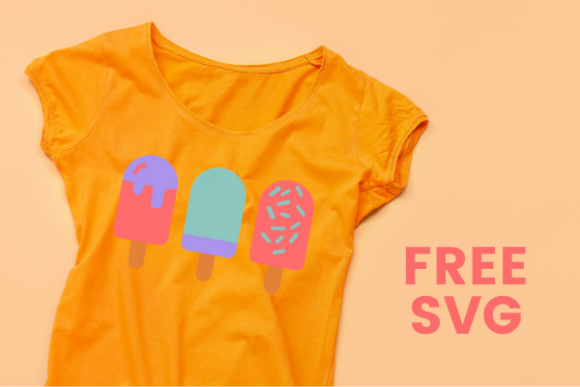
- T-Shirt Design: I tested it on a mockup using a soft pastel palette. The result was eye-catching but not overwhelming, which is perfect for kids’ apparel or casual summer wear.
- Mug Design: The design fits well within the typical mug size and even looks good when mirrored or duplicated for a double-popsicle effect. It’s a subtle yet effective way to add character.
- Tumbler Wraps: Especially popular among iced drink lovers, this design brings a refreshing twist to tumblers and water bottles. Just make sure to scale it correctly for the wrap dimensions.
- Printable Wall Art: As a digital product creator, I often design printable art for home decor. Popsicles makes a cute addition to a summer wall art bundle or as part of a larger layout.
- Gift Tags & Party Favors: The design is lightweight enough to be used on smaller items like gift tags, cupcake toppers, and party favor boxes. It adds a festive flair without being too busy.
- Greeting Cards & Scrapbooking: A single popsicle illustration can serve as a decorative accent or central theme. Pair it with a handwritten-style font and you’ve got a sweet summer card ready to go.
- Handmade Packaging: Think custom labels for frozen treats or packaging for homemade lemonade. Popsicles adds a sense of authenticity and fun to any handmade item.
- Small Business Branding: If you’re running a seasonal handmade business, consider using Popsicles as a recurring motif in your branding — from social media posts to product listings.
Where This Design Shines
Here are the areas where I found the Popsicles graphic design asset to perform exceptionally well:
- Large Cut Files: The design has generous spacing between elements, making it ideal for bigger projects like large signs or banners.
- Clean Printable Layouts: Thanks to its simple structure and solid color blocks, it prints clearly and cleanly, even at lower resolutions.
- Seasonal Craft Bundles: It slots perfectly into a summer-themed design bundle, especially if you're selling digital products on platforms like Etsy or Creative Marketplaces.
- Decorative Accents: Use it as a border element or background detail to enhance other illustrations without overpowering them.
- Personalized Items: Add names or dates around the popsicles to turn them into custom keepsakes or personalized gifts.
- Product Mockups: The PNG version included in the freebie download allows for quick previewing and editing. I placed it on white ceramic mugs and dark canvas tote bags — both looked great with minor tweaks to color contrast.
- Handmade Shop Collections: I integrated it into a summer line-up of tumbler wraps and stickers. It helped tie the collection together visually and boosted sales during peak season.
When to Use It Carefully
While Popsicles is versatile, there are a few limitations I noticed during testing. Here’s what to keep in mind before adding it to every project:
- Very Small Cutting Details: The fine details inside the popsicles aren’t suited for miniatures. If you try to cut it on a tiny surface, you might end up with messy results or broken pieces.
- Crowded Compositions: Don’t overload your design with too many popsicles unless you have room to space them out. It can get cluttered quickly, especially in layered vinyl or complex layouts.
- Low-Contrast Colors: While the default palette is vibrant, using muted tones may dull the impact. Always preview how it looks against your chosen background or fabric.
- Layered Vinyl Projects: The popsicle shape is great for single-layer designs, but if you’re doing multiple layers (like a base with a stick), check that each layer aligns cleanly after resizing.
- Small Sticker Sizes: For anything under 2 inches, simplify the design or focus on the main popsicle image only. The extra details won’t hold up and can lead to production issues.
Practical Crafter Tips for Using Popsicles
Before jumping into mass production or listing it in your Etsy shop, here are some steps I recommend:
- Test the File: Always test the SVG on your machine before committing to customer orders. Check for any jagged edges or alignment issues.
- Check Line Cleanliness: Open the SVG in a vector editor to ensure all lines are closed and properly grouped. This step helps avoid problems when cutting or printing.
- Preview PNG Transparency: If you're using the PNG for print-on-demand or online listings, zoom in to see how the transparency interacts with your chosen background.
- Confirm Sublimation Resolution: If you're planning to use it for sublimation, verify that the resolution is high enough to handle scaling up without pixelation.
- Test Colors Before Printing: Try applying different color variations to see what works best. Sometimes a slight shift in hue can make a big difference in final presentation.
- Try It on White and Dark Products: The same design can look very different depending on the substrate. Always test on both light and dark surfaces.
- Use Real Mockups: Place the design on actual product photos to get a better idea of how it’ll appear in real life. This helps with both creative decisions and customer expectations.
- Resize for Different Products: Popsicles scales well, but don’t forget to adjust proportions so it fits naturally on mugs, shirts, or wraps.
- Simplify the Layout if Needed: If you’re working with limited space, consider removing the background or isolating key elements for cleaner application.
- Pair with the Right Fonts: I found that it pairs best with script fonts, sans-serif styles, or display typefaces. Avoid overly ornate serif fonts that clash with the casual vibe.
- Confirm Commercial Licensing: Since this is a freebie, always check the license agreement before using it for commercial purposes. Some freebies allow personal use only, so it’s crucial to know where you stand.
Why Popsicles is Worth Adding to Your Design Toolkit
In today’s competitive handmade market, having the right graphic design asset can mean the difference between a product that blends in and one that stands out. Popsicles is a prime example of a design that bridges the gap between crafty and commercial. It’s fresh, functional, and flexible enough to support various creative workflows — whether you're crafting for a hobby or managing a full-fledged Etsy shop.
What I appreciate most is how it feels like a real illustration rather than a generic clipart piece. It carries a hand-drawn warmth that appeals to both Cricut enthusiasts and Silhouette artists. Plus, since it’s categorized as a Graphics Freebie, it’s accessible to anyone building a handmade brand on a budget.
For those preparing a seasonal design bundle, this is a must-have. It can be paired with related assets like ice cream scoops, suns, or beach umbrellas to create a cohesive summer collection. And for printable product creators, the PNG format gives you a lot of flexibility for digital downloads and instant gratification offerings.
Final Thoughts for the Busy Maker
If you're a creative entrepreneur or hobby maker in need of a new summer staple for your handmade business, Popsicles is a solid choice. It’s not just another graphic design asset — it’s a conversation starter that brings joy to both the creator and the customer. From sublimation design to gift tag accents, it’s a versatile tool that can help you stay ahead in a fast-moving market.
Just remember to approach it with intention. Test, tweak, and tailor it to your specific project needs. That’s the beauty of using a thoughtful SVG design — it gives you control over how it appears in your finished products. So take a moment to explore its possibilities and let it inspire your next batch of Etsy products or craft fair offerings.